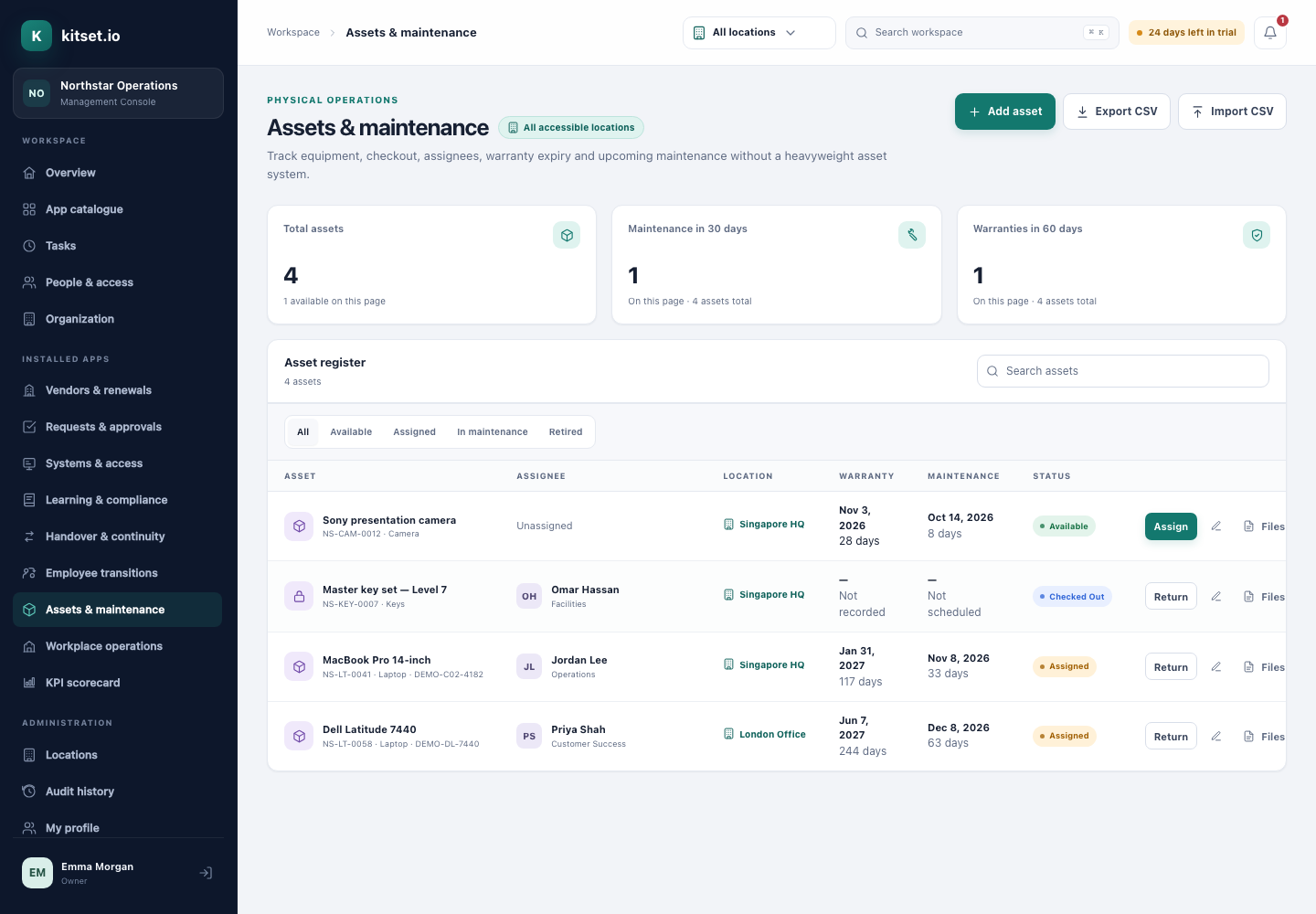
Know who has every laptop, and when it is due back.
An asset register with a tag, a serial number, a location, a warranty and a next maintenance date for every item, and a custody history that shows who held it, when, and who handed it over.
Assign equipment to someone with an expected return date, and change the date without reissuing it. Once it is late, the holder and the people who manage assets there are reminded each week, up to ten times, until it is returned or given a new date.
Custody history
Every checkout and return is kept: who held it, from when to when, who issued it and who took it back.
Warranty and maintenance reminders
Reminders before the warranty expires and before the next maintenance date, to the holder and the people who look after that location: 30 days ahead, unless Asset settings choose another lead time.
Repairs, services and inspections
Record the work done on each asset with its cost and the receipt or engineer's report. The person holding it reports a problem or asks for a replacement from the Portal.
Changes in bulk
Change the status of a selection at once, or of every asset matching your filters. Import from CSV with a preview first, and update existing assets matched by their tag.
Receipts and photos attached
Attach receipts, warranty documents and photos to each asset.
How it works
Register
Import or add assets with their tags, serials, locations and dates.
Assign
Check equipment out to people, who see it in the Employee Portal with the date it is due back.
Look after it
Warranty and maintenance reminders, and equipment recovered from leavers.
For administrators and employees
In the Management Console
Administrators manage the register with saved views, column choices, an Overdue filter, bulk status changes and CSV import and export.
In the Employee Portal
Employees see the equipment assigned to them and when each item is due back.
Every plan includes some apps: Team 3, Growth 5 and Scale all 13. A plan includes your most expensive selected apps, and each app past that is billed at its own price. Past your plan's allowance, Assets & Maintenance is S$35 a month, and annual billing charges 10 months for the year.
Does it track repairs?
Yes. Each asset's page keeps the repairs, services and inspections done on it, with the cost and the receipt, beside its next maintenance date and an In maintenance status. It is not a work-order system: there is nothing to schedule or dispatch.
Can an employee report a broken laptop?
Yes, from the laptop's row in the Employee Portal, with photographs. The people who look after it are told, or, where your workspace sends equipment to the Service Desk, it becomes a ticket.
Can employees see their own equipment?
Yes. The Employee Portal shows each person the assets assigned to them, and when each is due back.
What happens when equipment is not returned on time?
The holder is reminded the day before and on the day it is due, unless they borrowed it that day. Once it is late, they and the people who manage assets at that location are reminded each week, up to ten times, and it shows under Overdue in the register until it is returned or given a new date.
Try Assets & Maintenance in a workspace of your own.
5 Console users, 500 Portal users, 25 GB of storage and any 3 apps, free for 30 days. No card, no call.