The Service desk takes the requests people raise, puts each one in a queue such as IT, Facilities or HR, and gives the people who answer that queue one place to work them. Open it from Service desk in the Console sidebar, or go there now.
It has up to three views:
My tickets: the tickets you raised yourself.
Desk: the tickets in the queues you answer, or the queues you manage.
Queues: where queues, their agents and their categories are set up. See Set up the service desk.
Who can do what
Raise tickets lets someone ask for help and follow their own tickets. Admins and Portal users have it by default.
Work tickets lets someone pick up, answer and resolve tickets, but only in the queues they are named an agent of. Admins have it by default.
Manage the service desk lets someone set up queues where their access reaches, and act on every ticket in those queues.
Owners and System Admins can read every queue's tickets, including HR's.
The desk
Tickets to answer lists the tickets in your queues, newest first. It shows those Still open; choose Resolved, Closed or All for the rest. The second list narrows it to Anyone's, Mine, or Nobody's yet.
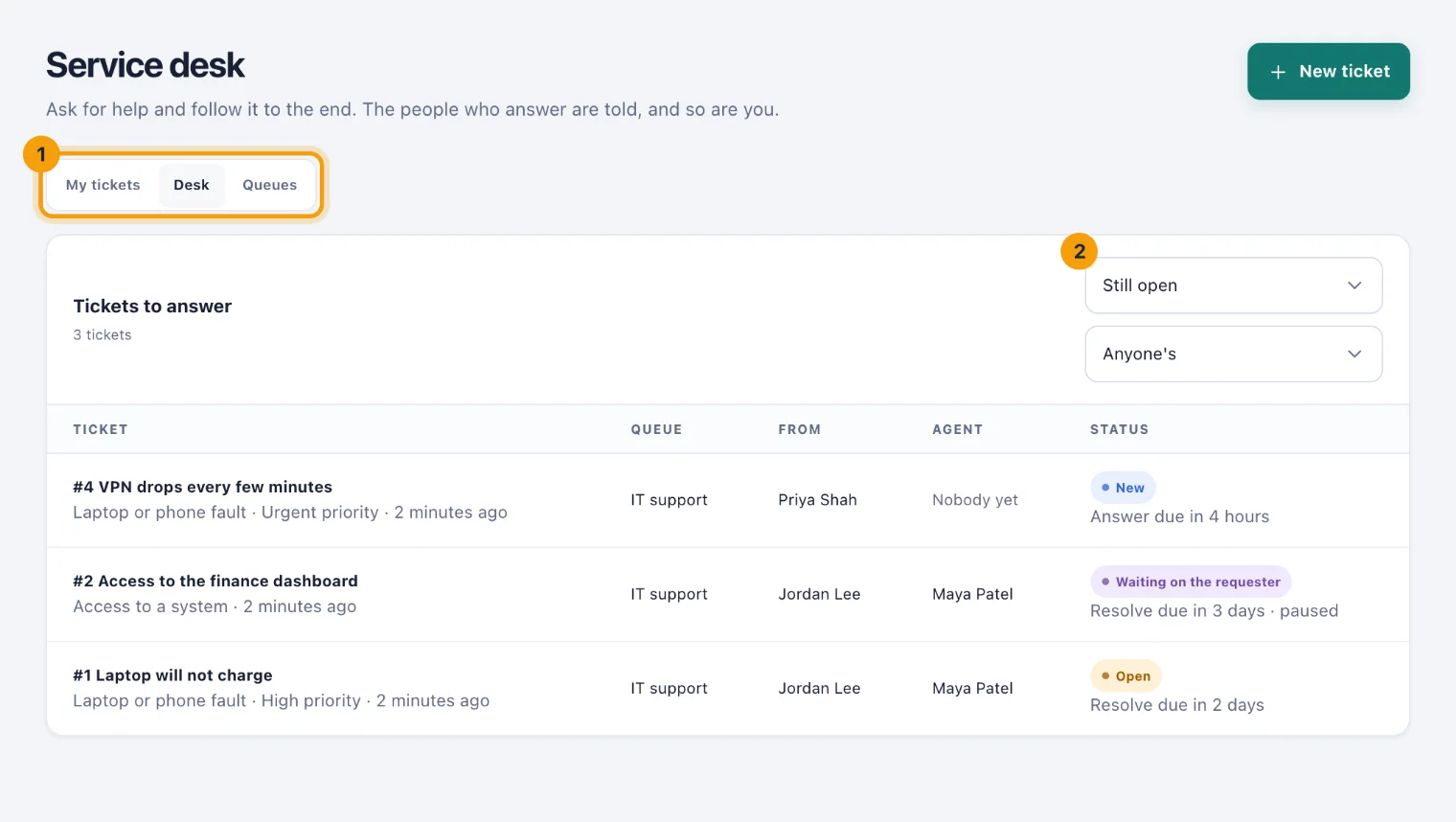
Each row shows who raised the ticket, which Agent has it (or Nobody yet), and its status. Under the status, the next target and when it falls: Answer due in 3 hours, say, or Resolve was due 2 days ago, with paused while the ticket waits on somebody else.
Work a ticket
Choose the ticket's number and subject to open its page.
Choose Take it to make it yours. A new ticket becomes Open. Give it back returns it to the queue for another agent.
Write in the reply box (1) and choose Send. The requester is told.
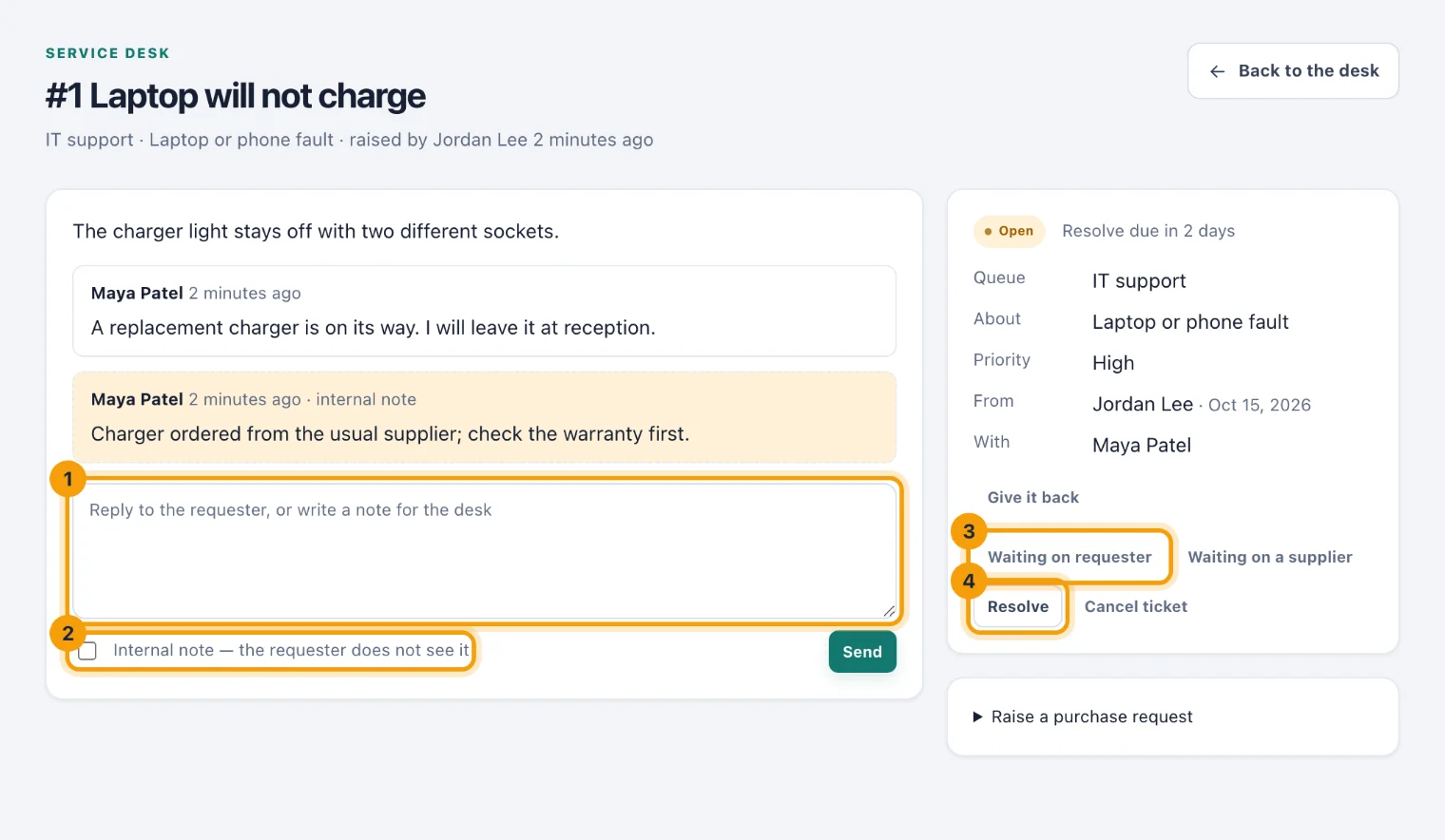
A ticket's page: reply (1), make it an internal note (2), wait on the requester (3), or resolve it (4). To write to the desk instead, tick Internal note — the requester does not see it (2). Notes are kept on the ticket and tell nobody.
Move the ticket on with the buttons beside it: Waiting on requester (3) or Waiting on a supplier while you wait, Resolve (4) when it is sorted, or Cancel ticket if it is not needed. A resolved ticket offers Reopen and Close.
Your first reply to the requester counts as the ticket's answer, and a new ticket becomes Open when it gets one. When the requester replies to a ticket that is waiting on them, or resolved, it is Open again.
What the requester can do
The requester can reply, cancel their ticket while it is open, and close or reopen it once you resolve it. After it is resolved they can rate it from 1 to 5. See Get help from the service desk.
Answer and resolve times
A ticket's category can set how soon it should be answered and how soon resolved. The clock starts when the ticket is raised. While it is Waiting on requester or Waiting on a supplier, the clock stops, and when it starts again the due times move on by the time spent waiting.
When an open ticket passes a target, its agent is told, or every agent of the queue while nobody has it. Each target is reported once.
Who is told what
A new ticket goes to every agent of its queue, under the bell and by email. A high or urgent ticket is marked as a warning.
A reply from the requester goes to the agent who has the ticket, or to every agent while nobody has it.
Your replies go to the requester, and so does a ticket you resolve, close or cancel.
Internal notes tell nobody, and nobody is told about their own action.
Raise a purchase request from a ticket
When a ticket needs something bought, and your workspace uses Requests & approvals, open Raise a purchase request on the ticket. Enter What to buy, the Amount and its Currency, and choose Send for approval. The request goes through the usual approvals, and its decision is noted on the ticket. See Requests and approvals.
Raise a ticket yourself
Choose New ticket, choose the queue in Who it is for and the kind of request in What it is about, say what you need in In a line, set How urgent, and choose Send. Follow it under My tickets.
Tickets from other apps
Equipment problems. When a Portal user reports a problem with equipment they hold, it becomes a ticket if a queue at the asset's location, or for the whole company, has a category about assets.
Workplace records. If you work tickets and manage workplace records, Create ticket on a record in Workplace operations raises a ticket for whoever reported it. See Workplace operations.
Dashboards. A dashboard can read the desk's tickets live, to count how many were answered in time. See Build a dashboard.