Once a workspace has a subscription, every change to it is bought through Update my subscription on Plans & billing: the plan, the billing cycle, capacity and apps together. Stripe charges the difference at once.
If you have not subscribed yet, there is nothing to change: choose what you want and subscribe. See Plans & billing.
Make a change
Open Plans & billing.
Choose the plan card, Monthly or Annual · 2 months free, the capacity and the apps you want. The Subscription preview reprices as you go.
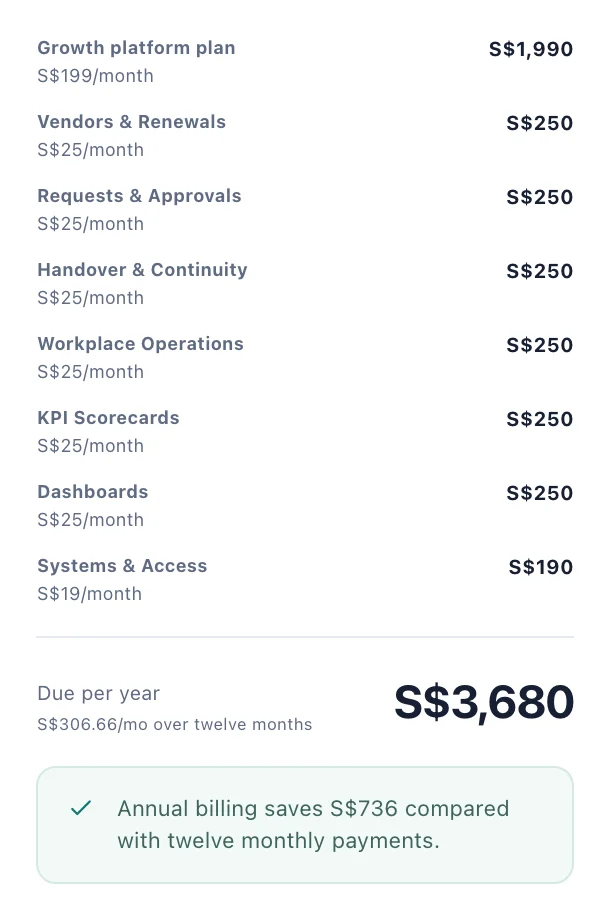
The preview prices what you have chosen. On annual billing it shows the saving against twelve monthly payments. Choose Update my subscription.
Check the confirmation. Update your subscription? lists the plan, Console users, Portal users, File storage, Apps, any apps Adding or Removing, and the New total.
Choose Update subscription.
You see Subscription updated. The change is prorated against what you have already paid, so the amount taken today is the difference, not the full total. Your new capacity and apps appear once the payment clears.
Monthly or annual
Annual billing charges ten months for a full year, and the preview shows the saving. Switching cycle is a change like any other, made with Update my subscription.
Moving to a smaller plan
When you choose a smaller plan, the capacity boxes keep your current numbers, so you would go on paying for the difference as packs. Lower Console users, Portal users and Storage in GB to what you need before you update. Each box stops at the new plan's own amount.
If the workspace then holds more files than its storage, the files are kept but new uploads are refused until there is room. Check how many people and files you have on People & access and Files & storage before a downgrade.
Prices you already pay
A line you already pay for keeps the price you pay, unless today's price is lower. Something new, such as an extra app or a different plan, is bought at today's price. The preview shows the price that will be charged.
When you cannot change the plan
While the first payment is clearing, the plan changes once Stripe confirms it.
While an invoice is unpaid, settle it first. See Invoices and failed payments.
After the subscription has ended, start a new one with Continue to secure checkout.