Every plan includes a number of Console users, Portal users and gigabytes of file storage. When you need more of one without moving up a plan, add it in packs. A pack is added to any plan, and billed every month alongside it.
| 5 extra Console users | S$35 per month |
|---|---|
| 500 extra Portal users | S$39 per month |
| 50 GB extra storage | S$15 per month |
Add capacity
Open Plans & billing.
In the Capacity card, raise Console users (1), Portal users (2) or Storage in GB (3). Each box starts at what your plan includes and moves in whole packs; a number in between is billed as the next whole pack.
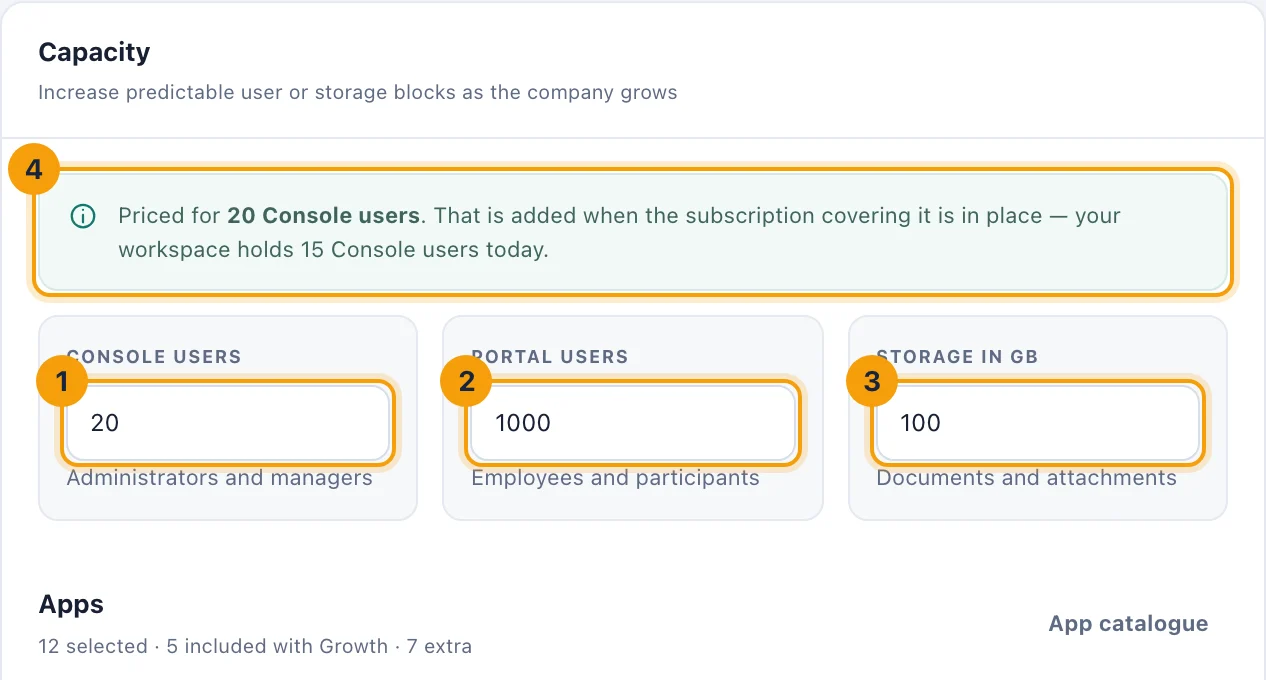
Capacity: Console users (1), Portal users (2), Storage in GB (3), and the note saying what is priced (4). Read the note (4). It says what has been priced, and that the capacity is added when the subscription covering it is in place. Your workspace keeps what it has until then.
Check the new lines in the Subscription preview.
Choose Continue to secure checkout if you have no subscription yet, or Update my subscription if you have one.
The new capacity appears once Stripe confirms the payment. Choosing Save plan selection during the trial does not add packs; it gives the trial only the chosen plan's included capacity.
When the workspace is full
Console and Portal users. People & access shows how many of each licence are in use. When a licence is full, inviting or importing another person on it is refused with Console user capacity reached or Portal user capacity reached. An invitation that has not been accepted yet holds a seat. Deactivating someone frees theirs.
Storage. Files & storage shows how much is in use. When the workspace holds more than it includes, every file is kept, but new uploads are refused until files are deleted or storage is added. The Owner has Add storage on that page, which leads here.
Removing capacity
Lower a box to remove packs, then choose Update my subscription. If the workspace then holds more files than its new storage, every file is kept, the Owners are told Files are over the storage you now pay for, and new uploads are refused until there is room.
You cannot lower a box below what your plan includes. To go lower, choose a smaller plan; see Change your plan.