Each service desk queue can have its own email address. An email to it becomes a ticket in that queue for whoever sent it. Most teams keep the address people already use, such as [email protected], and forward it to the queue's address, so nobody has to learn a new one.
Only people in your workspace can raise tickets by email, and only from the address they sign in to kitset with. Email from anyone else is refused, and nothing is sent back to them.
Send a ticket by email
If your desk has turned email on, write to its address as you would to a person:
The subject becomes the ticket's subject, and the message its description.
Attach files as usual: up to 10, each up to 25 MB. Pictures pasted into the message are kept. Small images, such as a logo in a signature, are left out.
kitset emails you the ticket's number. The desk answers in kitset, and you hear about it as you do for any ticket.
Send it from the address you sign in to kitset with. If you're not sure the desk has email turned on, raise the ticket from Get help instead; see Get help from the service desk.
Turn email on for a queue
This needs Manage the service desk where the queue takes tickets from.
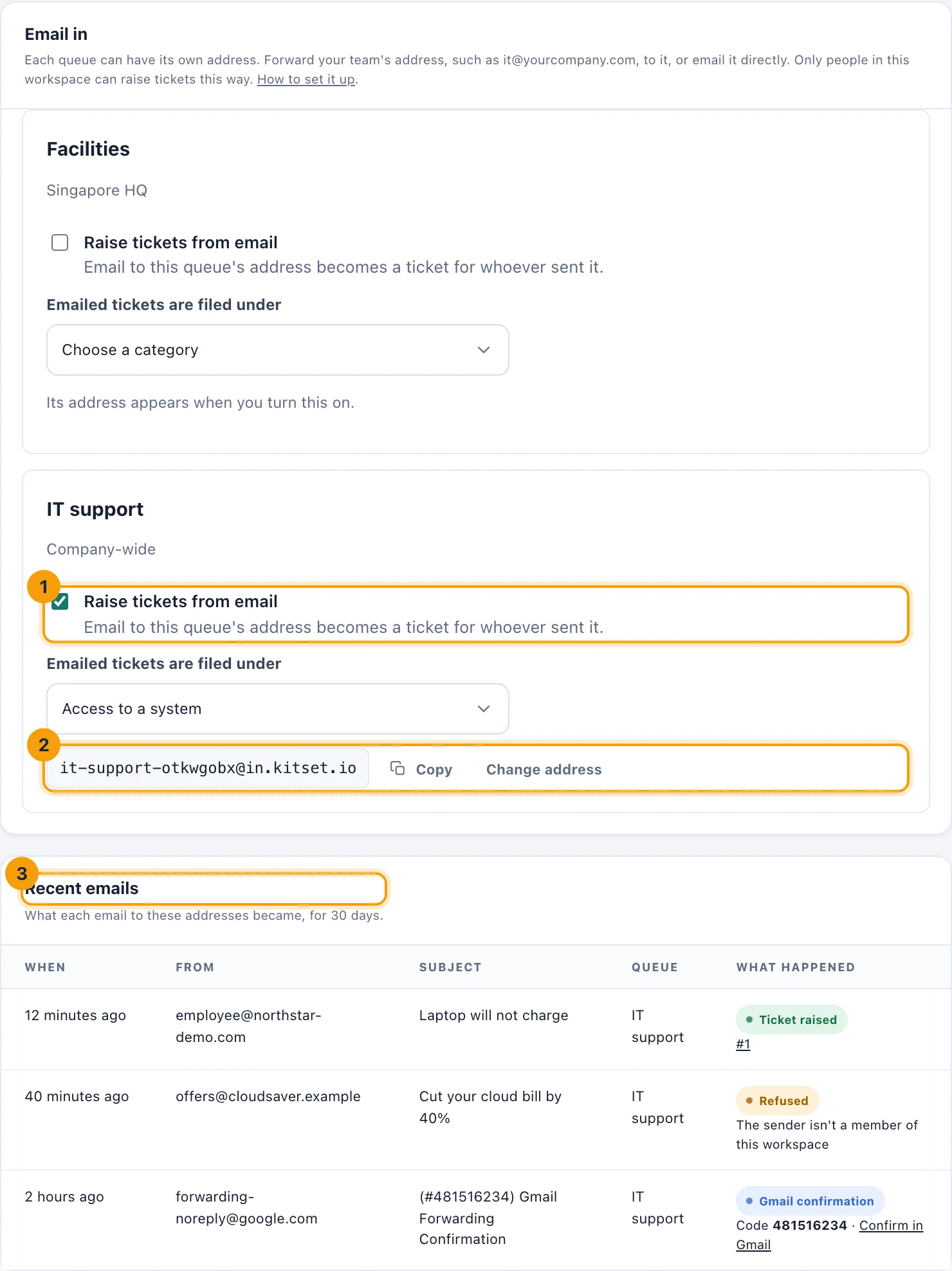
Open Service desk, then choose Settings at the top right, then Email in.
On the queue, tick Raise tickets from email (1).
If the queue has categories, choose which one emailed tickets are filed under. An email can't choose one, so the queue needs one chosen for it.
The queue's address appears under it (2). Choose Copy.
Forward your team's address
Forward the address people already write to so that it also reaches the queue's address.
Google Workspace: an administrator adds a routing rule in the Admin console, under Apps, Google Workspace, Gmail, Routing, that also delivers the address's mail to the queue's address. Or, in the mailbox itself, use Gmail's Settings, Forwarding; see Gmail's confirmation below.
Microsoft 365: in the mailbox's Outlook settings, under Mail, Forwarding, forward to the queue's address. Microsoft 365 blocks forwarding outside your organisation unless an administrator allows it, in the outbound spam policy in Microsoft Defender, for that mailbox.
Any other provider: set the address to forward, or redirect, to the queue's address.
Gmail's confirmation
When you add a forwarding address in Gmail's settings, Google first sends a confirmation email to that address, which here is the queue. It never becomes a ticket. Under Recent emails it appears as Gmail confirmation, with its code and a Confirm in Gmail link.
Why an email was refused
Recent emails lists what each email to your queues' addresses became over the last 30 days: the ticket it raised, or why it was refused.
The sender isn't a member of this workspace. Only people who sign in to kitset can raise tickets by email, from the address they sign in with.
kitset couldn't confirm who sent it. kitset checks that the sender's own email domain signed the message, so that nobody can raise a ticket in a colleague's name. If every email from your company is refused this way, your domain doesn't sign its mail yet. In Google Workspace, an administrator turns on Authenticate email (DKIM) under Apps, Google Workspace, Gmail. In Microsoft 365, they turn on DKIM for the domain in Microsoft Defender.
It was an automatic reply or a mailing list's. Out-of-office replies and messages from mailing lists never become tickets.
Email is turned off for this queue, The queue is archived, or No category is chosen for emailed tickets in this queue. Each is put right in Email in, or in Queues and Categories.
The sender may not raise tickets in this queue. The queue takes tickets from a location the sender doesn't belong to, or they can't raise tickets at all.
More than 20 emails in an hour from this sender. The rest wait for them to raise in kitset.
It was larger than 25 MB, It was marked as spam, or It carried a virus.
When kitset is sure who sent an email it refused, and they can do something about it, it tells them, at most once a day, with nothing of what they wrote. When an email gave somebody's address but couldn't be confirmed, that person is told that someone may be sending email in their name. If none of a domain's mail can be confirmed, the desk's managers are told once a day instead, and a warning stays at the top of Email in.
Change a queue's address
If the address reaches the wrong people, choose Change address. The old address stops working at once, so change your forwarding to the new one.