Vendors & renewals is the register of everything the business pays for on a cycle: software subscriptions, infrastructure, professional services, facilities contracts and insurance. Each vendor records who owns it, what it costs, how many seats were bought and assigned, when it renews and how much notice cancelling needs. Open it from Vendors & renewals in the Console sidebar.
It is a Console app. Nobody in the Employee Portal sees vendor costs or contracts.
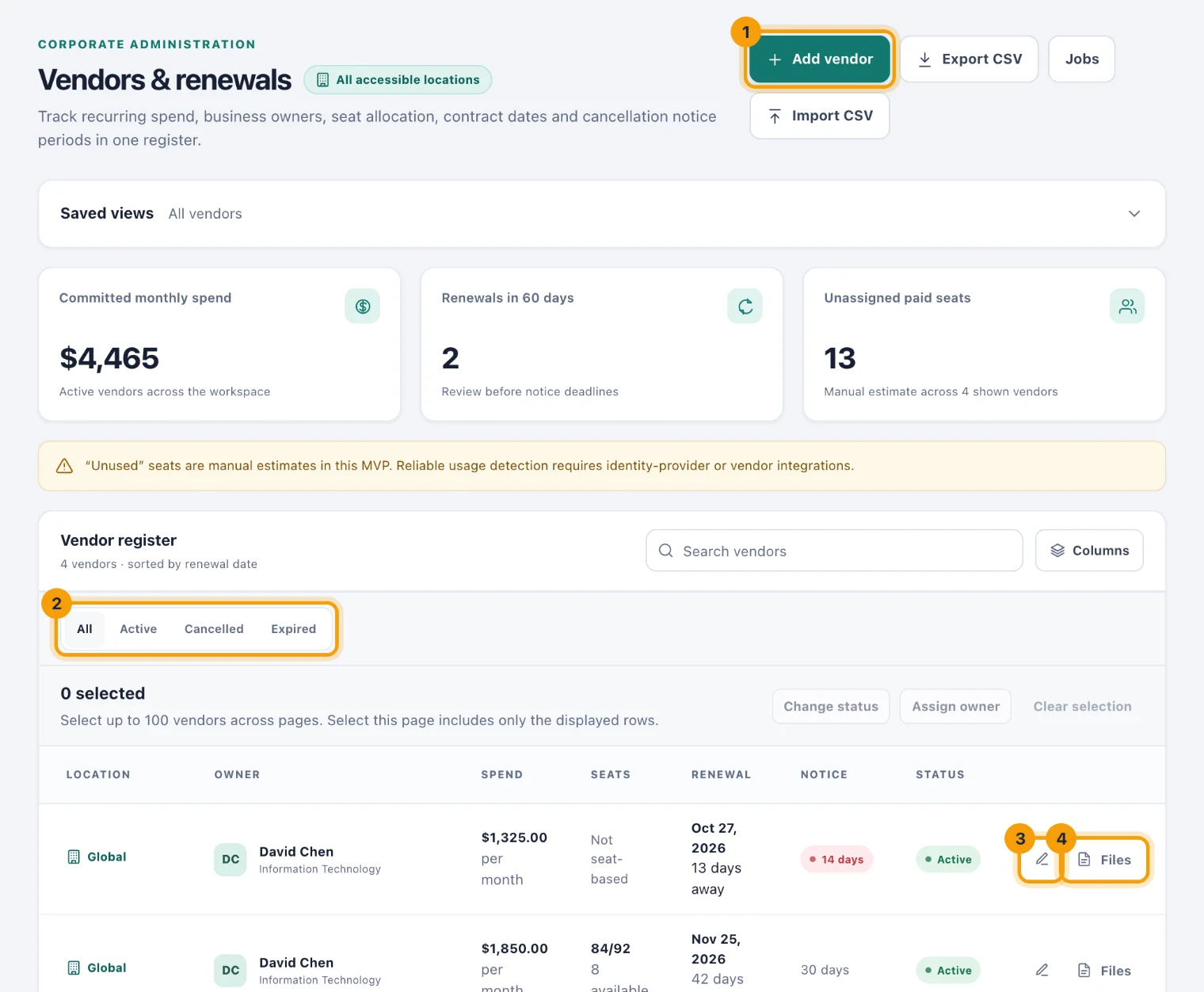
What the page shows
Three figures sit above the register:
Committed monthly spend. What your active vendors cost each month, totalled for each currency.
Renewals in 60 days. Active vendors that renew in the next 60 days, so you can review them before their notice deadlines.
Unassigned paid seats. Seats bought but not assigned, across the vendors on the page.
Add and find vendors
Add vendor (1) records a new vendor. See Add or change a vendor.
To find one already in the register:
Type in Search vendors to match a vendor's name or category.
Choose a status tab (2): All, Active, Cancelled or Expired.
To see one location's vendors, choose it in the location selector at the top of the page.
The register lists the soonest renewal first. Each row shows the vendor, its location, its business owner, its spend per month, its seats (assigned out of purchased), its renewal date with the days left, its notice period and its status.
Notice turns red when the renewal is closer than the vendor's notice period. That means the last day to cancel has arrived or passed, so the next renewal will most likely go ahead.
Change a vendor
Choose the pencil on a row, Edit vendor (3), to change its details or mark it Cancelled or Expired. The pencil only appears if you are allowed to change vendors.
Renewal reminders
kitset.io counts down to the cancellation deadline, not the renewal date. The deadline is the renewal date minus the notice period, the last day you can still decline. A vendor renewing on 30 June with 30 days' notice has a deadline of 31 May.
For each Active vendor with a renewal date:
A reminder named for the vendor, such as Review Microsoft 365 renewal, arrives 30 days before the deadline, again at 14, 7, 3 and 1 days, on the day itself, and once more after it has passed.
It goes to the vendor's business owner, and to the Console users who can see vendors at the vendor's location.
It shows under the bell and is emailed too. The email follows the Reminders setting in your profile.
Cancelled and expired vendors get no reminders. Moving the renewal date forward after you renew starts a new countdown for the next renewal.
Files and contracts
Files (4) on a row holds the vendor's contracts, quotes and renewal paperwork. Anyone who can see the vendor can open them. People who can change vendors can also add files with Add a file and remove them.
Who can do what
See vendors. Admins can by default. Owners and System Admins always can.
Add and change vendors. The same people by default. Add vendor and the pencil appear only for people with this permission.
Narrower access. Custom access can limit either permission to some locations. See Scoping access.