When someone joins or leaves, the people coordinating it in the Console set up an onboarding or an offboarding. If you are part of one, it appears under My transitions in the Employee Portal sidebar. The page is titled Employee transitions.
You see a transition if you are:
The person joining or leaving. The card names you as the Transition employee.
The buddy, replacement or coordinator: looking after a joiner, or taking over a leaver's work.
The owner of one of its actions.
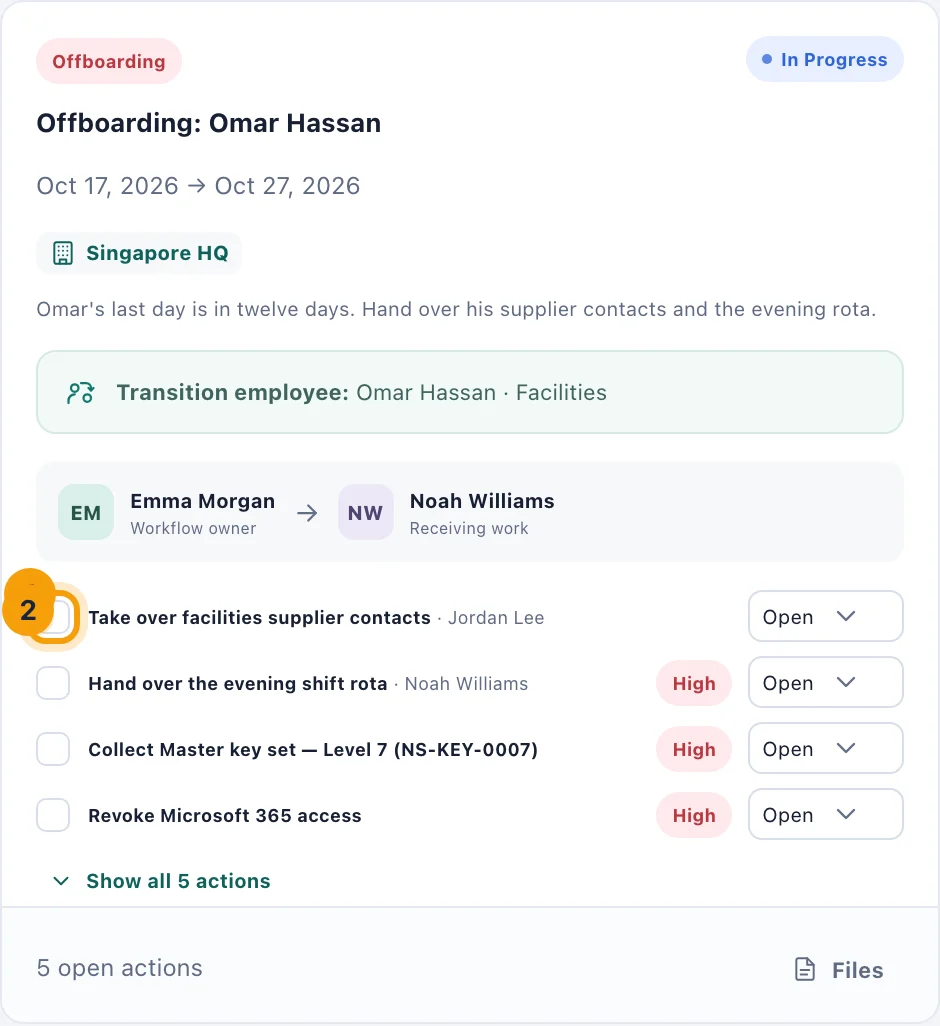
What a card shows
Each card shows the type, Onboarding or Offboarding, its title and dates, its status, and its summary. Under that are the Transition employee, the Workflow owner who started it, and the buddy or replacement. Then come its actions, each with its owner and, when it matters, High priority. The card shows the first four; a button such as Show all 5 actions lists the rest.
An offboarding's checklist includes rows kitset.io added from what the leaver holds, such as collecting a laptop or revoking a system's access. The people running the offboarding work through those.
Your actions
Once a transition is submitted, you are told under the bell about any action that is yours, and it appears in My tasks with its due date. On the card, tick the box beside it (1) when it is done, or choose its status (2): Open, In progress, Blocked or Complete. Completing it in either place completes it in both.
If you are the buddy or replacement, you can update every action on the transition, and you can Acknowledge it, once it has been submitted, to confirm you have taken it on. Your review task is then completed.
If you are the one leaving
Your offboarding is completed in the Console, usually on your last day. When it is, the equipment still assigned to you is recorded as returned, your access to the company's systems is removed, your space bookings that have not finished are cancelled, and your account is deactivated, which signs you out. Hand your equipment back before then, to whoever looks after it.
What you cannot do here
Transitions are started, submitted, completed and closed in the Console by the people who manage them. If something on yours is wrong, such as a date or who is looking after you, ask them.