My systems in the Employee Portal lists the company systems you are connected to: the ones you hold access to, and the ones you are named as business or technical owner of. It is a record kept by your administrators, so you can see what they believe you have.
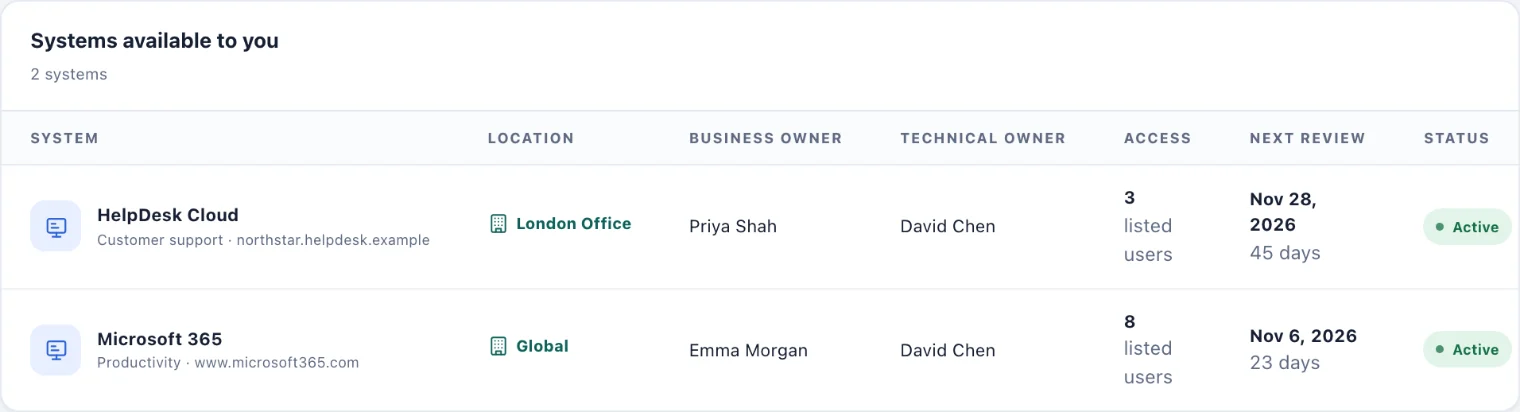
What each row shows
System. The system's name, its category and the address you sign in at.
Location. Where it is used, or Global for a system the whole company shares.
Business owner and Technical owner. The person who decides who should have access, and the person who runs it.
Access. How many people are listed as holding access.
Next review. When access is next checked, with the days left.
Status. Active, Deprecated or Retired.
Files (1) opens documents attached to the system, such as how-to guides or ownership records. You can read them; only administrators add them.
Something is wrong or missing
Your administrators keep this list, so you cannot change it here.
A system you use is missing, or one you no longer use is still listed: tell its business owner, or whoever looks after systems in your workspace.
You need access to a system: ask its business owner. Being added here records the access; the account itself is set up in the system.
You own a system that has no owner listed: let your administrator know, so access reviews reach the right person.
Access reviews
Your administrators regularly check that everyone on a system still needs access. If you no longer appear on a system after a review, your access was removed in that review. Ask the business owner if you still need it.