An access review is a regular check that everyone who holds access to a system still needs it. In kitset.io it is a signed record: a decision for every person, who made it, when, and the date of the next one. Signing it also removes the people you decided against. You need permission to change systems to sign one.
Sign a review
In Systems & access, choose Review on the system's row. The Review access to page opens for that system, showing when it was last reviewed.
For each person, choose Keep or Remove (1). The count at the top shows how many you have decided.
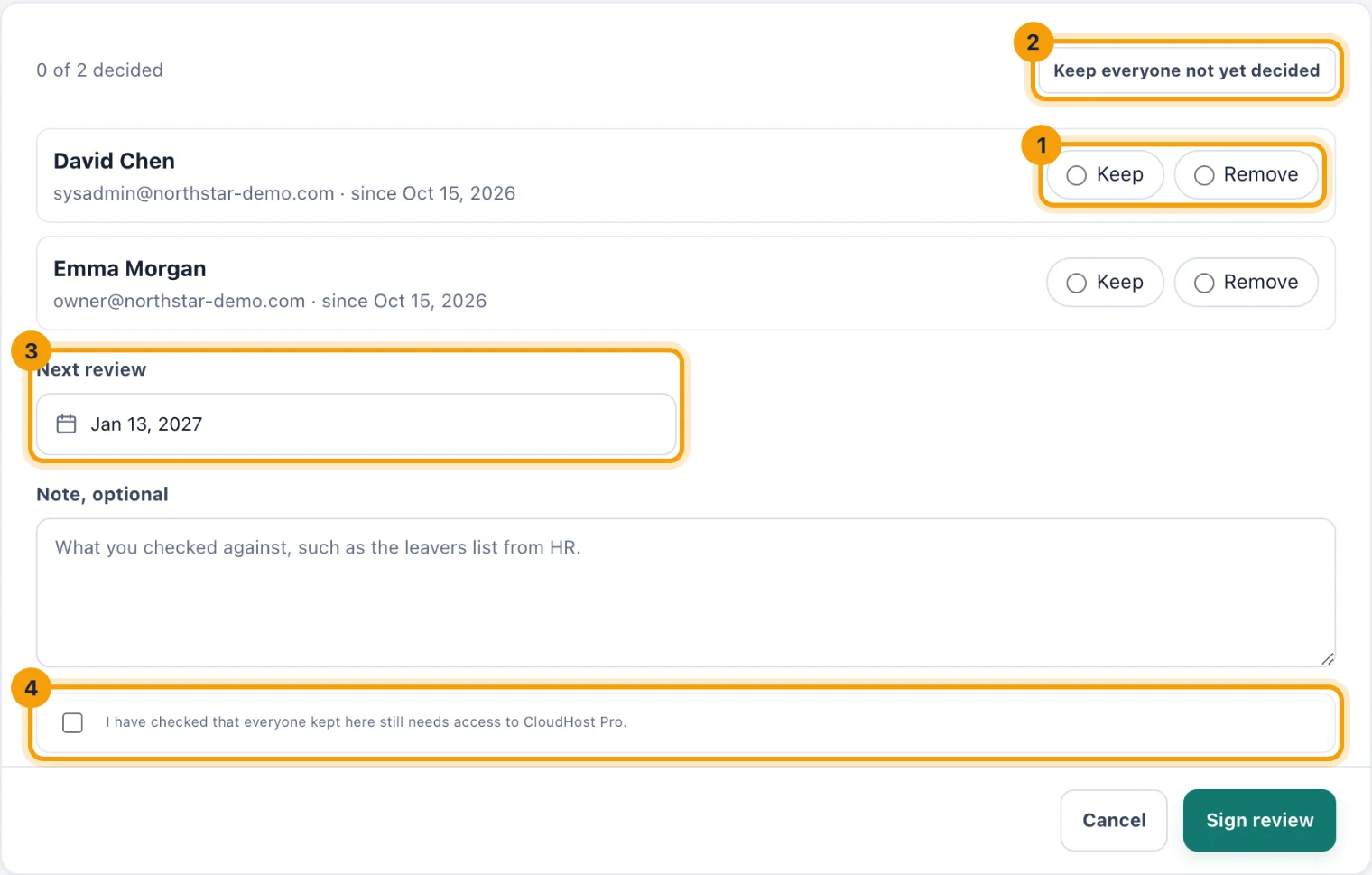
An access review. Every person needs a decision before it can be signed. When everyone left should keep access, choose Keep everyone not yet decided (2) to finish the list.
Check the Next review date (3). It suggests the system's usual interval again, or 90 days for a first review, and can be from tomorrow up to a year away.
Optionally, add a Note, optional: what you checked against, such as the leavers list from HR.
Tick the confirmation that everyone kept still needs access (4).
Choose Sign review.
The people you chose to remove lose access straight away. The system's last review becomes today, its next review moves to the date you chose, and its reminders stop until that date comes near.
People the page decides for you
Accounts that can no longer sign in start on Remove and are labelled Deactivated, Has not accepted their invitation or Erased. Keeping one is allowed, but it has to be your choice.
People at locations you do not manage are kept, and labelled so. An administrator who covers their location can remove them.
A long list gets a Find a person box, so you can go straight to someone.
A system with nobody on its access list can still be reviewed. Signing records that it was checked.
Read the access history
Choose Access history on the system's row. The page has two lists, newest first:
Signed reviews. The date, who signed it, the outcome and how many people were kept and removed. Open a review to read every decision in it, and the note.
Access changes. Who was given access and who lost it, when, by whom, and where it happened: on the system, in an access review, at offboarding or on erasure.
Every review and every change stays in the history, including for people who have since been erased.
Keep evidence
Export reviews, at the top of Systems & access, downloads the signed reviews as a CSV file for an auditor.
Files on a system's row holds anything you checked against, such as an export from the system itself.