Many notifications are also sent to your email address, so you hear about them without signing in. Every email says what happened and links straight to it in kitset.io.
Choose which emails reach you
Open My profile from the sidebar.
Under Email notifications, untick a kind to stop those emails, or tick it to have them again. The change is saved straight away.
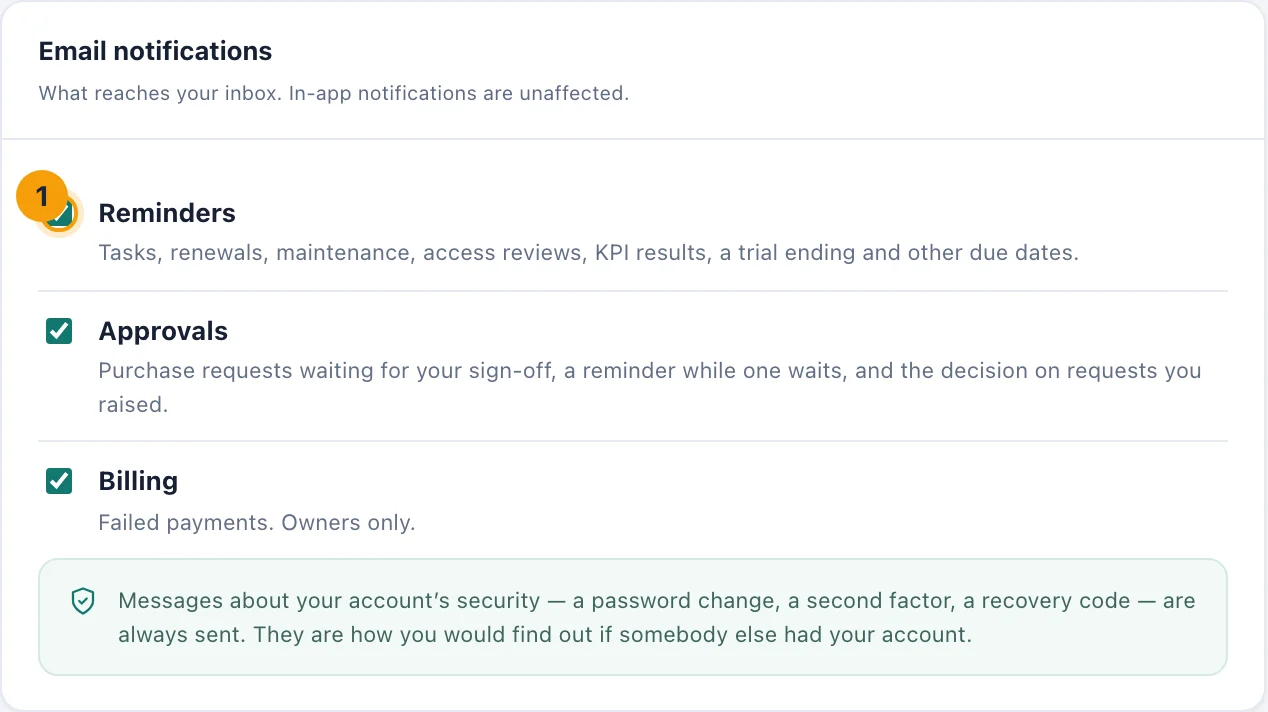
Email notifications. Untick a kind (1) to stop those emails; the bell is unaffected.
The kinds are:
Reminders (1). Tasks coming due or overdue, renewals, maintenance, warranties and returns, access reviews, workplace follow-ups, KPI results, a trial ending and other due dates. Also company events announced to you, service desk tickets (a new ticket for your queue, a reply, a status change, a target missed), your bookings confirmed or cancelled, problems reported with assets, and messages your workspace's automations send by email.
Approvals. Purchase requests waiting for your signature, a reminder while one keeps waiting, and the decision on requests you raised. Shown only when your workspace uses Requests & approvals.
Billing. Failed payments. Only Owners are sent these.
Unticking a kind stops the emails only. The same notifications still appear under the bell, so nothing is lost.
An email about something you can turn off includes a link to your profile, where the setting is.
In kitset.io only
Some notifications are never emailed, whatever your settings. For example, a task someone assigned you appears under the bell only, and so does a request to approve a space booking. Reminders about the same task, once it has a due date, do come by email.
Not receiving emails?
Check your profile. The kind may be unticked.
Accept your invitation. Until you have accepted your invitation to the workspace, kitset.io sends you no notification emails. Whatever is waiting for you is under the bell when you first sign in.
Ask an administrator. If your address bounced or was marked as spam, the workspace may have stopped sending to it until it is fixed.