Owners and System Admins can change anything in the workspace, so a stolen password for one of their accounts is the most dangerous kind. The two-factor policy decides whether those two roles must use an authenticator app as well as a password.
The policy covers Owners and System Admins only. Anyone else can turn two-factor sign-in on for their own account, and nobody can make them.
Choose a policy
Open Security & sessions in the Console sidebar.
In the Two-factor authentication card, find Require for Owners and System Admins (1).
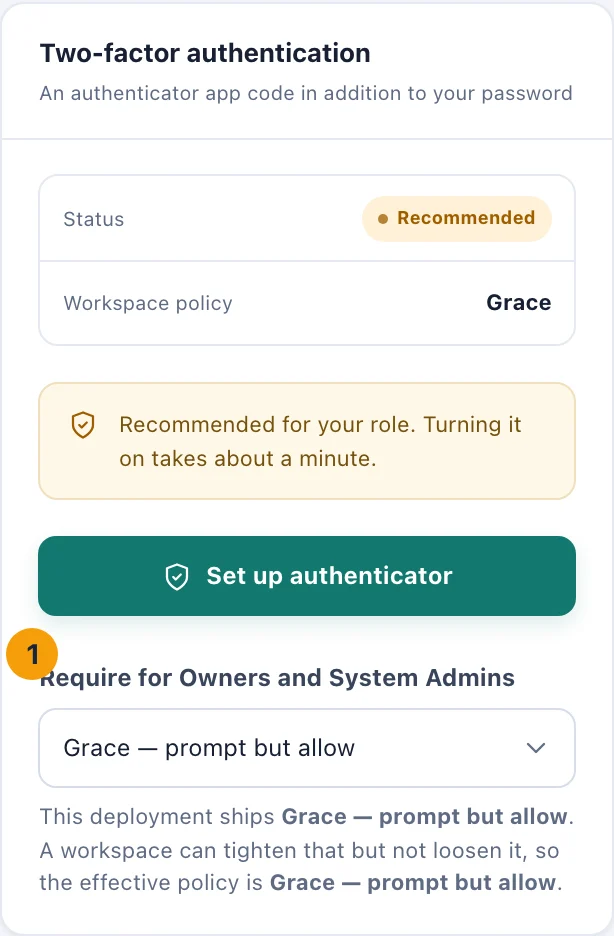
The policy sits under your own two-factor settings, and only Owners and System Admins see it. Choose one of the three settings. The change is saved straight away, and you see Two-factor policy updated.
The three settings:
Off — optional for everyone. Nobody is asked.
Grace — prompt but allow. Owners and System Admins without an authenticator see two-factor marked Recommended on their Security & sessions page. They can still sign in without one.
Enforce — required to sign in. An Owner or System Admin without an authenticator is asked to set one up when they sign in, before they can do anything else. Turn off is no longer offered to them.
New sign-ins follow the new policy at once.
The deployment's own setting
kitset.io sets a minimum for every workspace. The note under the menu names it, for example This deployment ships Grace — prompt but allow. A workspace can be stricter than that minimum but not looser, so the Workspace policy line in the card shows the policy that actually applies.
Who can do what
See and change the policy. Owners and System Admins. The menu does not appear for anyone else.
Every change is recorded in the audit history, with the setting before and after.